
Choosing the correct system depends on your event’s size, frequency, and audience needs. Paper tickets bring simplicity, while mobile-first platforms add…

Choosing the correct system depends on your event’s size, frequency, and audience needs. Paper tickets bring simplicity, while mobile-first platforms add speed and contactless entry. Integrated tools combine ticketing with marketing and fundraising, and free models work best for low-cost or volunteer-run events. Models of ticketing systems vary based on how they handle sales flow, reporting, and attendee management.
Understanding the many types of ticketing systems begins with recognizing how each method changes ticket sales and entry flow. A proper ticket sales management system organizes your inventory and reduces no-shows, making every event feel seamless and professional for your guests.
At , we have built a ticket-selling platform that blends honest pricing with genuine human support. Our team listens to your challenges and provides tools that actually work, so you never feel abandoned after purchase.
Paper stubs and PDF printouts represent the earliest form of admission control. These physical tickets work well for small community shows or occasional gatherings where internet access may be limited. Lost tickets and counterfeit copies can create refund issues and confusion at entry points.
Print-at-home options add flexibility by letting buyers print tickets at home. The system emails a barcoded file that guests can present on paper or on a phone screen. Dim scanners often struggle with glare, folds, or low brightness, which slows entry lines.
Many organizers move away from these low-tech methods after experiencing one disorganized event. Lack of real-time tracking limits visibility into attendance and revenue. Repeated use of this format of ticketing system often leads to inefficiency for recurring events.
A basic web-based box office replaces paper handling with a centralized digital database. Customers choose seats or general admission slots from any browser and complete payment instantly. Staff can review live reports and check guests in using printed lists or barcode scanners.
This category of ticketing system software replaces manual tracking with structured digital sales control. Most platforms charge a per-ticket fee along with a monthly subscription for smaller venues. The interface focuses on simple purchasing flows without advanced fundraising or marketing modules.
Many theaters and concert venues find this middle-ground approach suitable for everyday use. Limitations appear when managing season passes or donation campaigns. Standard tools often treat each event as separate rather than part of a larger series.
Reserved seating systems assign every ticket to a specific row and seat number before purchase. This approach works best for theater productions, lectures, and sporting events where location matters to the audience. The software must display an interactive map that prevents double-booking and allows seat changes.
General admission systems sell entry without any positional assignments, letting patrons choose spots upon arrival. Music festivals, movie screenings, and standing-room concerts prefer this simpler model for faster sales. The software only needs to track total capacity and count remaining available slots.
Hybrid systems exist that combine both methods within the same event platform. You might reserve front section seats while keeping the back rows as general admission. This flexibility increases complexity, so ensure your vendor supports mixing modes before committing.
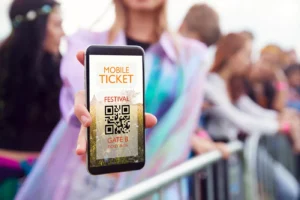
Mobile-first platforms prioritize smartphone use over desktop or printed tickets. Purchases happen through apps or responsive websites, generating dynamic QR codes. These codes refresh frequently to reduce duplication or screenshot misuse.
Digital wallet integration stores tickets inside Apple Wallet or Google Pay for offline access. Attendees avoid connectivity issues at venue entrances. Scanners read quickly, reducing check-in time significantly.
Last-minute transfers become simple through messaging or email sharing. Attendees can send tickets to others when plans change. Event organizers gain valuable data on which channels drive the most conversions.
Integrated platforms combine ticketing, marketing, donor tracking, and volunteer scheduling into one system. Instead of switching tools, administrators manage all tasks from a single dashboard. This reduces manual work between sales and outreach operations.
Our system at represents this integrated approach for theaters and nonprofits. sell seats, manage campaigns, track fundraising, and assign staff roles without changing platforms.
These systems also unify reporting across all revenue streams. Organizations can compare ticket income, donations, and additional sales in one view. This helps with budgeting accuracy and grant reporting.
Free ticketing systems charge no upfront fees but often take a percentage of each ticket sold. These platforms target volunteer-run events with very small budgets and simple needs. However, the per-ticket cut can exceed fifteen percent, eating deeply into low-priced admissions.
Paid systems operate on a monthly subscription plus a smaller flat fee per transaction. You gain access to dedicated customer support, advanced features, and your own branded selling page. For events selling more than a few hundred tickets, the subscription model almost always costs less overall.
Nonprofit organizations need ticketing that doubles as a donation collection tool. This system adds an opt-in contribution field during the checkout process for each ticket buyer. The platform then separates ticket revenue from donated funds in your financial reports.
Donation receipts must comply with tax laws while remaining easy for patrons to understand. Integrated systems automatically generate the correct language based on the contribution amount. Your development team can then export donor data directly into your CRM without rekeying information.
Season pass systems sell one product that grants entry to multiple events over a defined period. The software must track remaining visits, blackout dates, and transferable passes between family members. This model rewards loyal audiences while guaranteeing your organization upfront revenue before the season starts.
Membership ticketing adds recurring billing and exclusive perks beyond just event entry. Members might receive early access windows, discounted merchandise, or voting rights in organizational decisions. The platform handles automatic monthly or annual renewals with email reminders before each charge.
Both approaches require careful setup of expiration rules and renewal pricing tiers. A well-designed pass system reduces box office workload because members simply show their digital card. Your staff then spends less time selling individual tickets and more time improving the event experience.
On-site box office software powers the physical windows where customers buy tickets in person. This system syncs with your online inventory to prevent overselling across both channels. The interface must be fast enough for walk-up crowds while handling cash, cards, and checks.
Ticket scanner systems include handheld devices or phone apps that read barcodes at the door. Each scan marks that ticket as used, preventing someone from entering with a copy. Good scanners work offline and upload data once wifi returns, keeping lines moving during network outages.
Many organizations The scanner then validates both printed stubs and digital passes without distinction. This unified approach eliminates the old problem of separate lines for different ticket types.
Most paid platforms allow CSV exports of buyer emails and purchase history. Free systems sometimes restrict data portability to discourage you from leaving. Always ask about data export tools before signing any ticketing contract.
Yes, every mobile system should also offer print-at-home PDFs as a backup option. You can direct attendees with older devices to select paper tickets during checkout. A good platform handles both digital and physical admission methods simultaneously.
Stop fighting with disconnected tools that frustrate your staff and confuse your audience. We built our online ticketing platform for organizations that need genuine care, robust features, and transparent pricing without hidden fees.BookTix puts your success first because we know every ticket represents a relationship.
Compare our demo with any competitor and see why community theaters and nonprofits choose us year after year.